BEML Operator Admit Card 2026 Out – Hall Ticket Download
The BEML Operator Admit Card 2026 is out for candidates who applied for the Non-Executive Operator recruitment under Advertisement No. KP/S/10/2026.BEML has activated the hall-ticket download link on its official recruitment portal. Candidates can log in using their registration number and date of birth. The Computer-Based Written Test will be conducted on July 22, 2026.
Candidates should download their admit cards early rather than waiting until the exam day. Check your exam centre, reporting time and personal details carefully after downloading the document.
Download SarkariResult App Now
BEML Operator Admit Card 2026: Quick Overview
| Particular | Details |
|---|---|
| Organisation | BEML Limited |
| Post name | Operator on Tenure Basis |
| Recruitment type | Non-Executive |
| Advertisement number | KP/S/10/2026 |
| Total vacancies | 362 |
| Admit-card status | Released |
| Portal update date | July 17, 2026 |
| Exam date | July 22, 2026 |
| Exam mode | Computer-Based Test |
| Login details | Registration number and date of birth |
| Date-of-birth format | YYYYMMDD |
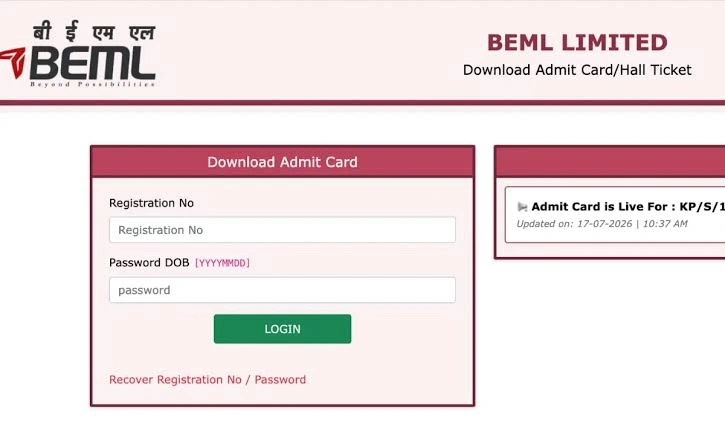
The official download portal states that the admit card is live for KP/S/10/2026 and requires candidates to enter their registration number and date of birth in YYYYMMDD format.
BEML Operator Admit Card 2026 Download Link
Candidates can download the hall ticket through the official BEML admit-card portal.
Official admit-card portal: Download the BEML Operator hall ticket here.
Avoid downloading the document from unknown websites. Third-party pages may provide updates, but candidates should enter their login details only on the official BEML recruitment portal.
How to Download BEML Operator Admit Card 2026
Follow these simple steps:
- Open the official BEML Careers page.
- Find Advertisement No. KP/S/10/2026.
- Click on the link named “Link for downloading Admit card.”
- The BEML hall-ticket login page will open.
- Enter your registration number.
- Enter your date of birth in YYYYMMDD format.
- Submit the login details.
- Open and check your admit card.
- Download the PDF and print a clear copy.
The official careers page lists the exam notice, eligible-candidate list and admit-card download link under the same recruitment advertisement.
Example of the Date-of-Birth Format
Suppose your date of birth is October 9, 2000. You should enter it as:
20001009
Do not use slashes, spaces or hyphens unless the portal specifically asks for them. The official login page requires the YYYYMMDD format.
Forgot Your Registration Number or Password?
The admit-card portal provides a “Recover Registration No/Password” option.
Use this option when:
- You cannot find your registration number.
- Your login details are not working.
- You have forgotten the password used during registration.
Keep access to the mobile number and email address entered in your application form because recovery details may be sent there.
The official portal also lists candidate support between 10:00 AM and 6:00 PM through helpline number 9205114492 and email helpdesk.beml@gmail.com.
Details Mentioned on the BEML Operator Hall Ticket
After downloading the admit card, check the following information:
- Candidate’s name
- Registration or roll number
- Photograph and signature
- Selected trade
- Examination date
- Reporting time
- Gate-closing time
- Exam centre name
- Complete centre address
- Important exam instructions
Contact the recruitment support team immediately when your name, photograph, category, trade or other important information is incorrect.
Do not try to change or edit the hall ticket yourself.
BEML Operator Exam Date 2026
The BEML Operator Computer-Based Written Test will be held on Wednesday, July 22, 2026.
BEML’s official exam notice confirms that the exam venue and reporting time will be mentioned on the candidate’s hall ticket.
Candidates should check their exam location as soon as they download the admit card. This will give them enough time to plan the route and arrange travel when the centre is in another city.
Documents to Carry to the Exam Centre
Candidates should carry:
- A clear printed copy of the BEML Operator admit card
- An original valid photo identity document
- Any additional document specifically mentioned on the hall ticket
Aadhaar card, PAN card, voter ID, passport or driving licence may be accepted as identity proof, depending on the instructions printed on the admit card.
Carry the original ID rather than relying only on a photocopy or mobile image.
SOME USEFUL IMPORTANT LINKS
| Official Website | Click Here |
| Admit Card Download | Not Yet Announced |
BEML Operator Exam Pattern 2026
The BEML Operator written test will contain 100 multiple-choice questions. The total duration will be two hours.
| Part | Subject | Questions | Marks |
|---|---|---|---|
| Part I | General Awareness | 20 | 20 |
| Part II | English and Reasoning | 20 | 20 |
| Part III | Concerned Trade or Discipline | 60 | 60 |
| Total | 100 | 100 |
Each question will carry one mark. There will be no negative marking for incorrect answers.
The written-test qualifying mark is 45%. Candidates belonging to the SC, ST and PwD categories receive a relaxation of five percentage points. Final selection will be based on written-test performance, followed by document verification and the required pre-employment checks.
Quick Exam Tip
Spend most of your revision time on your technical trade because the concerned discipline carries 60 out of 100 marks.
At the same time, do not ignore General Awareness, English and Reasoning. These two sections together carry 40 marks and can make a meaningful difference to your final score.
BEML Operator Vacancy Details
BEML announced 362 Operator vacancies across five ITI trades.
| Trade | Vacancies |
|---|---|
| Fitter | 127 |
| Turner | 93 |
| Welder | 44 |
| Machinist | 40 |
| Electrician | 58 |
| Total | 362 |
The official recruitment notice requires candidates to hold the relevant National Trade Certificate and National Apprenticeship Certificate, subject to the complete eligibility conditions mentioned in the advertisement.
What to Do When the Admit Card Is Not Downloading
A slow or busy portal is common when many candidates try to download their hall tickets at the same time.
Try these solutions:
Check the Login Information
Make sure your registration number is entered correctly. Enter your date of birth in YYYYMMDD format without spaces.
Use a Different Browser
Open the website in an updated version of Chrome, Firefox, Edge or Safari.
Clear the Browser Cache
Old website data can sometimes prevent a page from loading properly. Clear the browser cache and try again.
Switch Your Internet Connection
Move from mobile data to Wi-Fi or use another stable connection.
Try During Less Busy Hours
The website may work better early in the morning or later in the evening when fewer candidates are using it.
Use the Recovery Option
Select the registration-number or password recovery option when you cannot remember your credentials.
Contact Candidate Support
When the issue continues, contact the support number or email shown on the official admit-card portal. Keep your application details ready so the support team can identify your record.
Important Instructions for Exam Day
Reach the centre before the reporting time shown on your admit card. Do not plan to arrive just a few minutes before the examination.
Read all instructions printed on the hall ticket, especially rules about:
- Reporting and gate-closing time
- Accepted identity documents
- Prohibited electronic devices
- Photograph requirements
- Rough sheets and writing materials
- Biometric verification
- Dress-code restrictions, when applicable
Do not carry mobile phones, smartwatches, calculators, notes or other restricted items unless the admit card clearly permits them.
Last-Minute Preparation Tips
Revise Your Trade Notes
Focus on formulas, tools, safety rules, workshop processes and frequently tested technical concepts from your ITI trade.
Practise Without Guessing Fear
Since the official pattern states that there is no negative marking, candidates may attempt questions after using logical elimination. Do not spend too much time on one difficult question.
Prepare Your Documents at Night
Place your printed admit card and original photo ID in one folder before going to sleep.
Check the Centre Location
Search for the examination centre in advance and estimate the travel time. Keep extra time for traffic, security checks and finding the correct building.
Get Proper Rest
Avoid studying throughout the night. A rested mind will help you read questions carefully and manage the two-hour test effectively.
More Latest Admit Card Updates
Frequently Asked Question’s
Final Words
The BEML Operator Admit Card 2026 has been released for the July 22 Computer-Based Written Test. Download your hall ticket early, check the centre and reporting time, and keep a printed copy ready.
Use only the official BEML recruitment page for the latest notices. Carefully follow the instructions printed on your admit card because those instructions will apply at the examination centre.